St. Thomas E-Learning And Research - The Intersection of Technology and Pedagogy - Page 10
Future of Higher Education

HyFlex Model Expanding Into New Programs

The University of St. Thomas first offered a course in the HyFlex model during the summer of 2017.  Due to high student demand, FINC 321 was offered again using this delivery model during summer term 2018, and other programs are starting to offer HyFlex courses as a way to accommodate student preferences around course attendance.

What is HyFlex? 

HyFlex is a course delivery model that allows students to choose their mode of participation from online and on-campus options during each class session.  That’s right, each class session students can choose whether to come to campus or attend online.  Online options may include synchronous or asynchronous sessions.
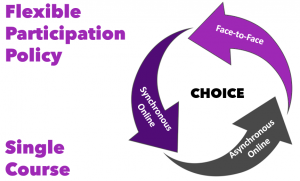
Flexible participation policy in a single course offering the choice of face-to-face, asynchronous online, or synchronous online

HyFlex was recently added by the Registrar’s office as an official course type category and is defined as, “Instruction is delivered concurrently via in-person class meetings, synchronous online class meetings, and asynchronous methods. Learners choose how they participate and engage each week.”

What does a HyFlex Course look like?

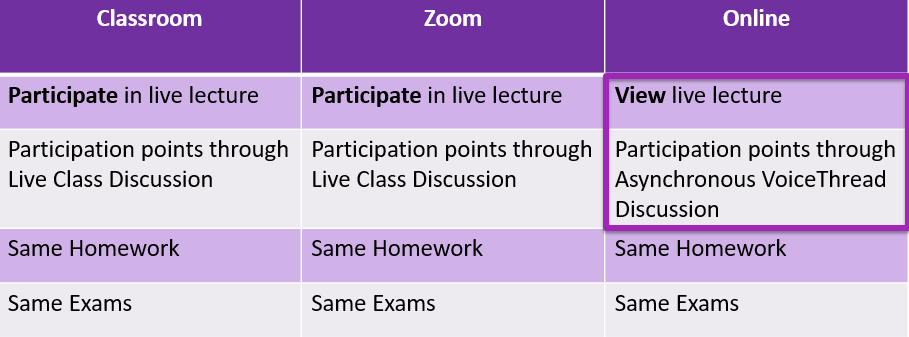
A HyFlex course strives to provide equivalent learning activities in all participation modes.  In FINC 321 students can participate in a live lecture on campus or through web conferencing or can view the lecture at their convenience online. Participation points are earned through live class discussions or through asynchronous VoiceThread discussions.
What technology is used?

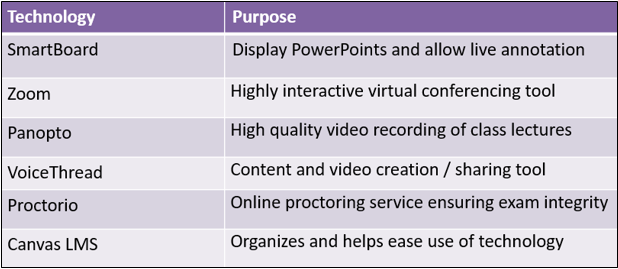
The HyFlex model is made possible through the use of cutting-edge technologies including Zoom, Canvas, Proctorio, Panopto, classroom video capture, and smart boards.  STELAR staff members are available to support faculty as they plan and develop these courses.
Integrating Online and Traditional Course Sections

In the graduate program in Special Education, Dr. Lynn Stansberry Brusnahan has found that students more often enroll in the online sections of required courses than in on-campus sessions. In order to honor individual student preferences for how they experience and participate in the class, Dr. Stansberry Brusnhan combined the online and on-campus sections of SPED 785: Behavior Management.

All of the students are in the same Canvas course site; on Wednesday evenings, they can come to class in Minneapolis Opus Hall, or they can attend online via Zoom and interact with the class remotely. If they aren’t available to attend during class time, they can watch the recorded lecture and provide a summary of what they learned. Students choose from week to week, so it’s all about student choice and preference. Courses in the educational leadership program are also exploring this model.

More Information about HyFlex

STELAR has presented about the HyFlex model at educational conferences including OLC Accelerate, the EDUCAUSE Learning Initiative (ELI) and the Minnesota eLearning Summit and has found a great deal of interest in this model with follow-up visits, conversations, and a write-up in Inside Higher Ed.  Also check out our February 2018 post Interest Building Around the HyFlex Model of Course Delivery.

Interested in exploring HyFlex for your own course?  STELAR may have a grant for that.  See the call for proposals section of our website.

This post was written by Glori Hinck, an Instructional Designer for the St. Thomas E-Learning and Research (STELAR) Center at the University of St. Thomas in St. Paul, Minn.  To learn more about this topic, please visit our website at www.stthomas.edu/stelar or email us at stelar@stthomas.edu.

 

Best Practices, Tips, and Tricks

8-Point Canvas Tune-up

Avoid common pitfalls and make your course easier to navigate with this 8-Point Canvas Tune-up.

Hide unused buttons 

Eliminate confusion and streamline the students’ experience by hiding any unused left-navigation buttons. You can also reorder the items in the left navigation to suit your needs.

Post your Syllabus in Syllabus 

In the Fall 2018 semester, more than 80% of St. Thomas students clicked on Syllabus in Canvas, expecting to find their course Syllabus. Make finding your Syllabus easy for students by posting your syllabus in Syllabus (found in the left navigation). You can upload a Word document or PDF or copy/paste the text directly into the page’s rich content editor.

Organize your course chronologically in Modules 

Organizing your course chronologically in Modules creates a natural progression through course materials and activities each week and eases navigation. It also helps students manage their workload because the modules contain everything they need—an overview page to provide context, a list of assigned readings, videos, or links, and assignments.

Stream course videos through Panopto 

Uploading or recording new videos in Panopto (St. Thomas’ video streaming and management system) gives you the ability to embed/link that video directly in Canvas, so students won’t need to download the video to view it, and you won’t need to worry about running out of space with large video files.

Send course updates via Announcements 

The best way to send a message to the whole class is to post an Announcement. Doing so triggers email, Canvas app, and text notifications (depending on how students set up their notifications) that tell students a new announcement exists. All announcements are also saved in the Announcements tool for future reference.

Turn files into Pages

Using Canvas Pages instead of files makes your content easily accessible on any device or operating system. Instead of presenting a series of files (handouts, documents, and PDFs) to students, you can use Canvas Pages to present the same information. The power of Pages is that you can present short instructions, long articles, hyperlink to websites, as well as link to multiple documents, all on a single page. You can also increase the visual appeal of your content with page headings, images, color, and much more.

Publish, publish, publish 

Courses, by default, are not published until you publish them. For students to see your course content, you must publish the course, the modules, and the items. Use Student View to make sure that the content you choose to share with students is available. (The Syllabus is automatically available as soon as the course is published.)

Check your dates 

Check your start and end dates in Settings to make sure your course is scheduled to open and close when you want. Remember, students won’t have access to the course (even if it is published) until the start date occurs. Also make sure the dates in your Syllabus match the dates built into your modules, assignment descriptions, Canvas calendar, and announcements. This will reduce questions and confusion from students, so you can keep their focus on learning.

This post was a collaborative effort among St. Thomas E-Learning and Research (STELAR) Center staff at the University of St. Thomas in St. Paul, Minn. To learn more about this topic, please visit our website at www.stthomas.edu/stelar or email us at stelar@stthomas.edu.

STELAR Events

Upcoming EVENTS from STELAR (December and January)

Take advantage of these hot topics for December and JanuaryDecember Tech Calendar

New Semester Prep: Canvas Course Refresher Sessions (virtually via Zoom)

If your course was previously taught in Canvas and you are getting it ready for a new semester, come learn 8 quick-tips to refresh your course!  These sessions are all offered virtually via Zoom so you can login from your location of choice!

Canvas Gradebook (St Paul)

Canvas One-on-One Consultation Appointments (in either Minneapolis or St. Paul)

Sign up for 30-minute blocks.

Canvas Hosted Training Sessions

Whether new or experienced with Canvas, sign up and attend in December, January and beyond.

STELAR has purchased access to pre-recorded and live Canvas training sessions, available through https://www.cysalesteam.com/instructure/. This is for all St. Thomas faculty and staff. The classes range from beginner (Introduction to Canvas) to topic specific (Outcomes & Rubrics for Instructors) and everything in between.  If you are interested in seeing what is available, you can Browse by Category and look through the Building Block Series, and the Classroom Application Series.

After you create an account, you have ongoing access to an extensive number of trainings (for both beginners and more experienced Canvas users).  You also have access to any recordings from past sessions. Here’s a short list of upcoming sessions of these Canvas hosted sessions:

Canvas Training Series: Assignments

Canvas Training Series: Course Basics

Many more offered in December and January.

Resources You Can Access at Any Point

You’ll want to bookmark these so you continue to see new opportunities showing up on the calendar.

Other Sessions of Interest

Zoom for Advising, Appointment Hours and Tutoring

Accessibility Practices in Zoom Sessions

Best Practices, Tips, and Tricks

Universal Design for Learning Recap

Last summer, Faculty Development hosted a Summer Seminar on Universal Design for Learning, or UDL. One of STELAR’s Instructional Designers, Karin Brown, presented on the Multiple Means of Action and Expression component of UDL and wrote a recap for Faculty Development’s Synergia newsletter. Click to read Karin’s article, “Using Principles from Universal Design for Learning to Create Opportunities for Student Choice.”

This post was written by Karin Brown, an Instructional Designer for the St. Thomas E-Learning and Research (STELAR) Center at the University of St. Thomas in St. Paul, Minn. To learn more about this topic, please visit our website at www.stthomas.edu/stelar or email us at stelar@stthomas.edu.
Upcoming Technologies

The Tommie Science Network: A High-Speed Research Network and ScienceDMZ

NSF Grant

Did you know that St. Thomas has received a grant of nearly $400,00 from the National Science Foundation to build a high-speed research network? The grant money will fund a science network that will connect researchers to a ScienceDMZ, which allows for extremely fast transfers within the network and to other institutions via Internet2. Initial speeds of up to 100Gb are planned, opening doors to significantly larger research datasets and real-time collaborations than are possible on a conventional network.

The Tommie Science Network

A research network achieves these speeds through a variety of mechanisms, starting with a network switch that can handle the speed. This is the single most expensive item in the project, coming in over $100,000 for a switch that will be dedicated to the science network. Typically, a science network is outside of the enterprise firewall as well, because a modern firewall inspects each packet (unit of information) that passes through it, causing unacceptable slowdowns to research traffic. To get around this, Access Control Lists on the research network switch have typically been employed, which allow authorized traffic to bypass the firewall. A modern method uses the ability of an enterprise firewall to detect the nature of incoming traffic and route it through the science network if authorized. This method maintains the speeds required for research computing but offers enhanced security and efficiency because the pipe is only open during transmission, rather than sitting idle waiting for traffic. Specialized software components include Globus, a high-speed file transfer and management system, and PerfSonar, a tool for monitoring and maintaining research network speeds. Finally, a DTN, or Data Transfer Node sits in the ScienceDMZ, consisting of a very fast computer with very large, very fast SSD storage drives. Research clusters, GPU machines and other research technology can also be placed in the ScienceDMZ for maximum efficiency. The University of Minnesota is our partner in this effort and will help us design the network as part of the grant. This is a huge benefit for St. Thomas as UMN has significant experience in this area and has direct access to the Northern Lights GigaPOP (Gigabit Point of Presence), where we hook up to Internet2!

NSF CC* PI Conference

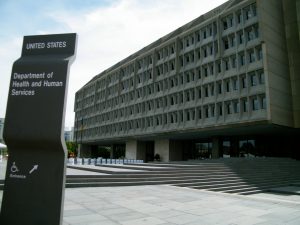
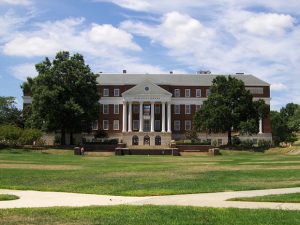
One condition of the grant is that the PI (Principal Investigator) attend the NSF CC* (National Science Foundation Cyberinfrastructure and Cybersecurity) conference in each of the grant years (this is a 2-year project). In September, Ed, Will and I attended this conference at the University of Maryland and gave a brief presentation on our grant. Writing the grant was a significant effort (especially since we had to do it twice- our first attempt was not awarded), which produced a 70+ page document highlighting the amazing science that is going on at St. Thomas. Many in the crowd empathized with our story and several shared similar experiences with us afterward. The conference in general was excellent. It was tight-knit group consisting of government funders, researchers, technologists and research network consortium principles. We learned a lot about how NSF funding works, pitfalls to avoid in network design and general best practices for running and maintaining a research network. The conference was in Maryland, which was extremely hot and humid during our stay. The University of Maryland hosted the conference on their lovely Georgian campus (apparently the only two design choices in the DC area are Georgian or Brutalist):

Georgian

Brutalist


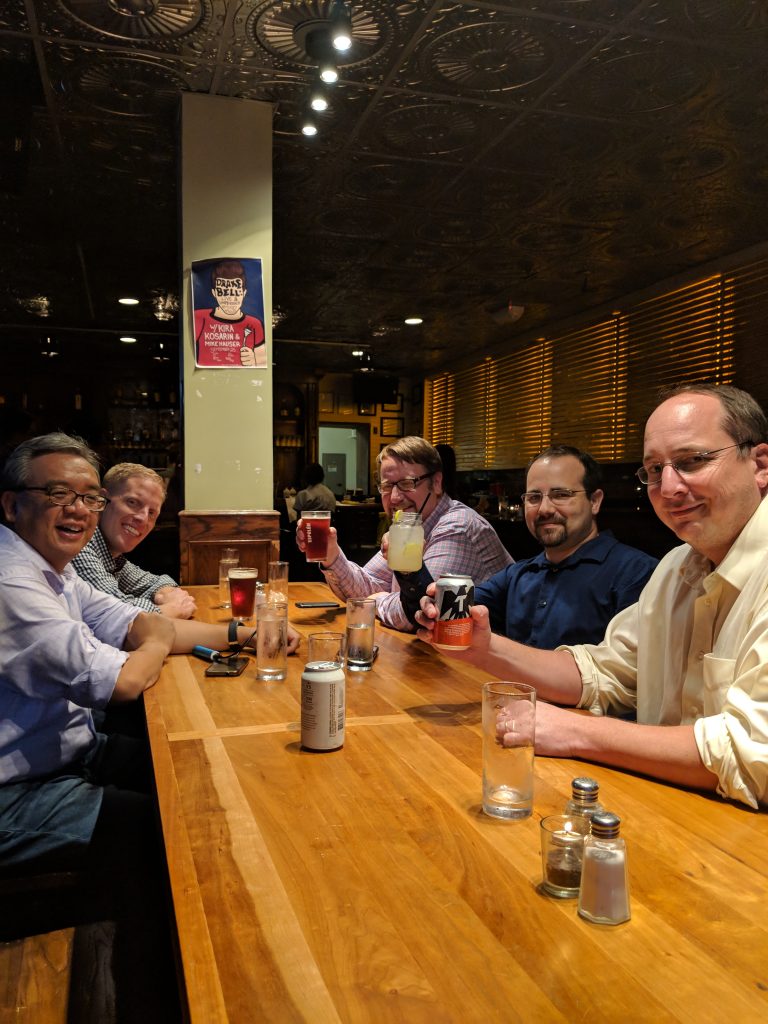
UMD has an area similar to Dinkytown nearby called College Park. Here are some of us with colleagues from the University of Minnesota and the University of Iowa (both of whom received similar grants) at MilkBoy Arthouse in College Park:

NSF CC* PI’s at MilkBoy ArtHouse

The Road Ahead

Now the fun begins- The grant period runs for two years, with a one-year extension possible. The first year will be dedicated to designing the network. Meetings have begun with UMN research networking staff as well as St. Thomas researchers as we consider the technical, organizational and support structures that will best serve our research community. When the network goes live 2-3 years from now, we will enter a new era of research capability at St. Thomas. This network will allow us to collaborate with other universities and science centers around the world at peer speeds, allow researchers from other institutions to logon to our resources with their own credentials, and provide seamless, high-speed access internally and externally to extremely large data sets that have been impossible to access at our current network speeds. This will in turn allow us to attract more high-quality researchers (to join our already exemplary cohort!) by offering them resources with capabilities normally found at much larger institutions.

Conclusion

We have taken the first step on the path to a significant upgrade to the university’s research computing capability. When complete, we will have access to Internet speeds that provide parity with the largest research universities and institutions in the world, along with a shared, secure identity space via InCommon that securely offers seamless, high-speed access to resources at any participating institution to any authorized researcher. From these seeds will grow a brand-new branch of the St. Thomas tree and resonate throughout the institution (and the world) for years to come.