St. Thomas E-Learning And Research - The Intersection of Technology and Pedagogy - Page 12
Student Systems of Support

Orientation and Community Sites: On the Move with Canvas!

This post identifies St. Thomas programs that have created Student Orientation and Community Sites within Canvas. STELAR is on the move with Canvas, and this is just the tip of the iceberg!

During this past year, numerous graduate programs have crafted new orientation and community sites for students, including the following: Organizational Ethics and Compliance LL.M., Social Work MSW, Catholic Studies MA, Online MBA, Health Care Graduate Program Cohort Sites, Online MBA Onboarding, Educational Leadership Doctorate, and the Full Time MBA Community Site. There are also programs that already had student sites in Blackboard and re-crafted them in Canvas, including the Doctorate in Social Work Online Program and the Special Education MA and License Program.

Undergraduate programs are also on the move with Canvas student success sites. For example, the summer 2018 Orientation to Online Courses pilot led to a fall 2018 launch of the Digital Learning Essentials site, providing access to technology and Canvas support to over 1,800 first-year students. In addition, the Dougherty Family College launched several student orientation and enrichment sites. Canvas is also being used to teach and test understanding of information such as the Financial Aid module and the Degree Planning Essentials site.

At the root of these orientation and community sites is the desire to help students to realize successful outcomes, as depicted in this photo of one of our Tommies:

St Thomas student working at her laptop with a joyful expression

That is why we create these student orientation and community sites: student success!

NEXT STEPS  

STELAR continues to partner with departments and programs to further connect our learning around community and student orientation sites.

  • If your program has a Canvas student community or orientation site and we accidentally missed naming your program in this article, please comment below or email STELAR to share what you’ve created.
  • Watch for an upcoming blog post that highlights some examples of how these Canvas sites benefit students.

On the move with Canvas, aimed at student success!

This post was written by Jo Montie, Online Learning Systems Facilitator with the St. Thomas E-Learning and Research (STELAR) Center at the University of St. Thomas in St. Paul, Minn. To learn more about this topic, please visit our website at www.stthomas.edu/stelar or email Jo at stelar@stthomas.edu.
Accessibility, Best Practices, Tips, and Tricks

Finding Captioned Videos on YouTube

Captioned videos are helpful for all students and they help us meet ADA accessibility guidelines. Your students will appreciate videos with captions when they’re in a quiet place and forgot their headphones, watching in noisy public places, or have trouble understanding the speaker.

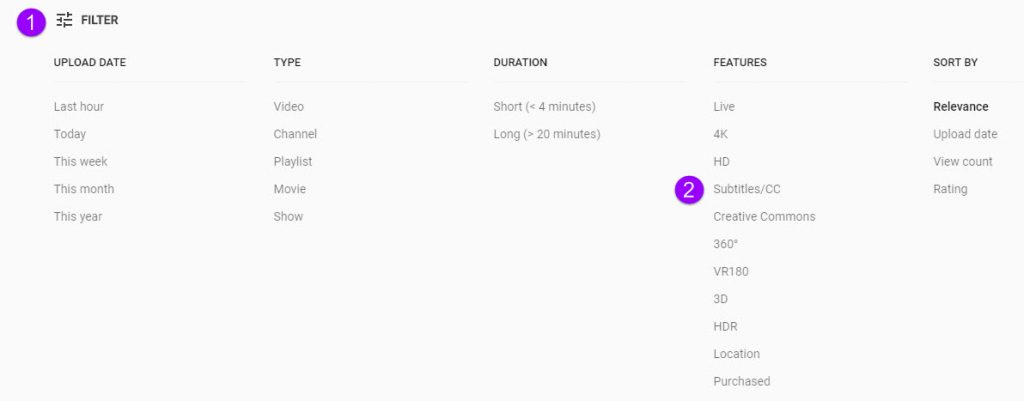
You can filter your YouTube searches so you only review captioned videos. Here’s how:

  1. Go to YouTube and type your search terms. Click the search button.
  2. When your search is completed, click the Filter button (1), then click Subtitles/CC (2).

Click Filter, then Subtitles/CC

Now your search results will only show videos that are already captioned. Please note, just because a video is captioned does not mean it is captioned accurately. You should still check to make sure the captions are well done.

And don’t forget that we have a huge amount of licensed media resources available through the library system.

This post was written by Nancy McGinley Myers, an Instructional Designer for the St. Thomas E-Learning and Research (STELAR) Center at the University of St. Thomas in St. Paul, Minn. To learn more about this topic, please visit our website at www.stthomas.edu/stelar or email us at stelar@stthomas.edu.

Technology Tools

Introducing the New Learning Outcomes Inspirator!

Do you have learning outcomes in your syllabus? Do you conduct training sessions or webinars with staff or students? Then the UST Learning Outcomes Inspirator is for you! The brand new Inspirator will guide you to write learning outcomes that are measurable and grounded in Bloom’s Taxonomy, leading to clearer expectations and a greater chance of success for learners.

Please visit and bookmark link.stthomas.edu/Inspirator and start using the Inspirator today!

This post was written by Karin Brown, an Instructional Designer for the St. Thomas E-Learning and Research (STELAR) Center at the University of St. Thomas in St. Paul, Minn. To learn more about this topic, please visit our website at www.stthomas.edu/stelar or email us at stelar@stthomas.edu.

Best Practices, Tips, and Tricks

The ANSWER is right at your fingertips: Reflections on Faculty Focus article

Article citation:

Yee, Kevin and Boyd, Diane. How Can We Amplify Student Learning? The ANSWER from Cognitive Psychology:
Faculty Focus. June 18, 2018. <
https://bit.ly/2lflsSO> (18 June 2018).


Fall semester is right around the corner.  How do you know your students are going to learn something this term?  Well, it’s obvious that they will learn this semester. Learning is like breathing. It comes naturally. However, by keeping in mind some principles suggested by cognitive psychologists, you can actually AMPLIFY your student’s learning.

The article: How Can We Amplify Student Learning? The ANSWER from Cognitive Psychology from Faculty Focus is a well-researched, yet simple reminder of how people learn.  De-emphasizing “learning styles” as the way we learn, the authors say it’s more about the science of learning based on extensive research in cognitive psychology.

The authors, Kevin Yee and Diane Boyd, present a simple acronym that’s easy to remember as a way to classify the elements necessary for cognitive change (i.e. learning) to take place: A.N.S.W.E.R. You’ll want to skim the article yourself to find out how each of these elements is defined along with appropriate examples.

A-attention

N-novelty

S-spacing

W-why

E-emotions

R-repetition

Granted, there are likely many other factors that contribute to deep learning, and it would be short-sighted to limit our student’s growth and progress by only these six areas. However, synthesizing powerful principles like the ones from Yee and Boyd into easy-to-remember nuggets of information can be extremely helpful in explaining what needs to be present for learning to stick.

In my work as an instructional designer with STLEAR, I often consult with faculty who are trying hard to emphasize to their students the importance of learning their subject matter. At the same time, I find myself trying hard to emphasize the importance of good course design so that we can reach the same goal – deeper student learning!  This is what it means to design with students in mind. Considering what students need for learning to take place is actually in the ANSWER.


This post was written by Michael Wilder, an Instructional Designer for the St. Thomas E-Learning and Research (STELAR) Center at the University of St. Thomas in St. Paul, Minn. To learn more about this topic, please visit our website at www.stthomas.edu/stelar or email us at stelar@stthomas.edu.

Best Practices, Tips, and Tricks, Canvas: Did you know...?

Duplicating items in modules

Did you know…

You can save time and effort by duplicating certain content items in Canvas and reuse them elsewhere? Yes! Many items like Pages, Assignments, and graded Discussions can be duplicated and then used in other modules. Let’s say you have a Weekly Overview page in Module 1 that includes complex formatting or repeatable instructions. Instead of re-creating a new Overview page for each subsequent module, you can simply duplicate the first module’s Overview page because it retains all the text, images, hyperlinks and formatting, and then just change out the specific text for the new Module.

To duplicate an item, click on the ellipsis (3 dots) to the right of the item and choose “Duplicate.” The item is duplicated (copied) below and includes the word “copy” in the title. The duplicated item will come in “unpublished.” After changing the text to reflect the new item, be sure to update the title and “publish” the duplicated item.


To learn more about this and other Canvas-related topics, join us on August 20-22 for Canvas On Campus: A 3 day event with Canvas representatives on campus covering a variety of topics and Canvas experts from STELAR available for instructional design and technology consultations.