Technology Tools – St. Thomas E-Learning And Research - Page 5
Browsing Category

Technology Tools

Technology Tools

OEC Studio Updates Benefit Content Creators and St. Thomas Community

The HD Multimedia Studio located in OEC LL2 has recently been upgraded to include several new functions that are useful not only for original educational material/content creators but also for the broader St. Thomas community to produce content in a highly controlled professional media production environment.

In addition to the multi-camera HD production capabilities, recent updates to the OEC multimedia production studio include:

  • The most fully integrated high-end media production SMART board on campus
    • 75″ screen
    • Display content and allow for content markup
    • Multi-color markup and highlighting
    • Individual screen capture or integrated into multi-camera production switched content
    • Recorded or live to web broadcast functionality
  • Live “Zoom” meetings integrated into the high-end media production facility
    • Take advantage of a highly-controlled production facility with staff support
    • Hold live web meetings with multiple remote participants
    • Record remote presenters
    • Useful for experts or presenters that are not always able to be in-person on location
  • “Panopto” multi-session recording capabilities
    • Individually capture SMARTboard as one source and professional cameras as another source
    • Fully utilize Panopto’s capabilities in your course using the studio’s high-end production cameras and gear

You can even view a 360-degree tour of the OEC studio!

These additional features add a whole new dimension to your content creation possibilities!  Stop by any time to the OEC Multimedia Studio located at OEC LL2 or email us at itsstudio@stthomas.edu to reserve a time to get a demonstration of the facility or to schedule a time to meet with studio staff to discuss your next project.

We look forward to working with you!

This post was written by Dan Lamatsch, a Media Services Senior Engineer for the St. Thomas E-Learning and Research (STELAR) Center at the University of St. Thomas in St. Paul, Minn.  To learn more about this topic, please visit our website at www.stthomas.edu/stelar or email us at stelar@stthomas.edu.

Technology Tools

Introducing the New Learning Outcomes Inspirator!

Do you have learning outcomes in your syllabus? Do you conduct training sessions or webinars with staff or students? Then the UST Learning Outcomes Inspirator is for you! The brand new Inspirator will guide you to write learning outcomes that are measurable and grounded in Bloom’s Taxonomy, leading to clearer expectations and a greater chance of success for learners.

Please visit and bookmark link.stthomas.edu/Inspirator and start using the Inspirator today!

This post was written by Karin Brown, an Instructional Designer for the St. Thomas E-Learning and Research (STELAR) Center at the University of St. Thomas in St. Paul, Minn. To learn more about this topic, please visit our website at www.stthomas.edu/stelar or email us at stelar@stthomas.edu.
Technology Tools

Journaling as a Teaching Strategy

Journaling is an effective way to help students deepen their understanding of concepts while supporting reflective and critical thinking.  TeachThought recently published an article discussing 20 Types of Learning Journals that Help Students Think.

Ready to explore one of these journaling strategies?  Perhaps the meta-cognitive journal would support student learning in your course.  Or maybe the change journal.  Our Office 365 Canvas integration supports password-protected digital journaling for private, student-instructor, or public journals.  The link below takes you through the step-by-step process and STELAR Instructional Designers can provide additional guidance!
Using OneNote as a Journal

This post was written by Glori Hinck, EdD, an Instructional Designer for the St. Thomas E-Learning and Research (STELAR) Center at the University of St. Thomas in Minneapolis, MN.  To learn more about this topic, please visit our website at www.stthomas.edu/stelar or email us at stelar@stthomas.edu.

Technology Tools

Using VoiceThread to Enhance Instruction for All Learners

Many faculty at the University of St. Thomas are already using VoiceThread as a way to actively engage learners and promote social presence in their online classes.

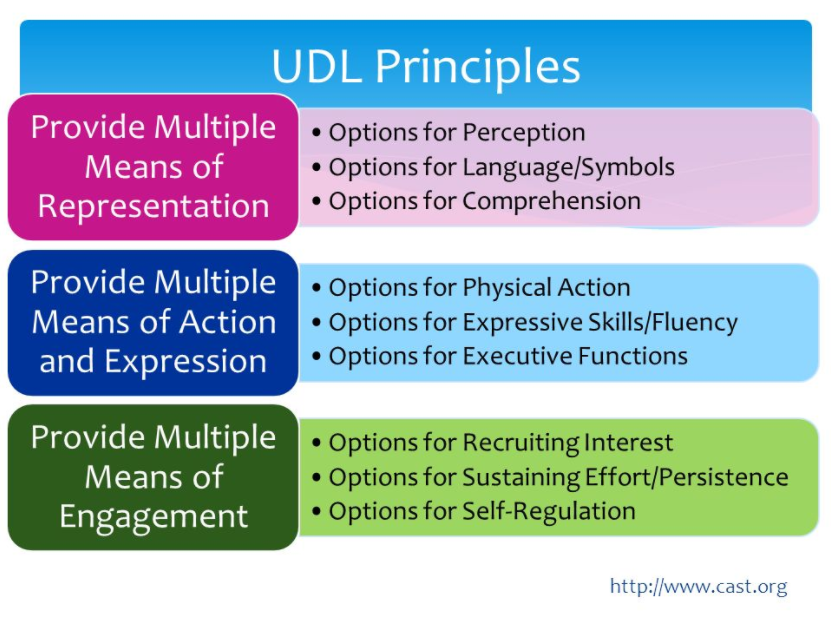
VoiceThread is a tool that allows students and instructors to use their voice and video as a part of  asynchronous discussions and presentations. From the ground up, the philosophy behind the VoiceThread technology has been to enhance the online UX (user experience) for all learners. To accomplish this, VoiceThread goes beyond the requirements for making things accessible under the American Disabilities Act. VoiceThread also does a really good job at targeting the principles of UDL Universal Design for Learning (UDL). DesigninUDL Principlesg online experiences with the lens of UDL, using a tool like VoiceThread, is a better way to plan for accessibility because it’s a holistic approach that supports all learners.

I recently attended a VoiceThread training on UDL and was amazed at how the tool’s features and functions address the major principles of UDL. If you’re not familiar with VoiceThread’s capabilities, I invite you to explore more at VoiceThread.com.

First, and most obvious, VoiceThread supports “Multiple Means of Expression” because participants can choose to write text comments or leave voice comments with a microphone, or video comments with a web camera. This make it a great tool for language learners. Instructors can see and hear how pronunciations are formed.  One example showed students interacting around a topic using ASL (American Sign Language).

Second, VoiceThread supports “Multiple means of Representation” because instructors can display information through images, Word docs, PDFs, or PowerPoint.  They can use the built-in annotation tools to highlight and call out certain information or focus the learner’s attention. In addition, each VoiceThread participant can choose  to display menus and tools in their own language.

The third way VoiceThread supports UDL is through “Multiple Means of Engagement.” Instructors can have students simply view a presentation (passive), post comments on any part of the presentation (more active). Or, they can have students create their own VoiceThread (highest level of engagement) and share it with others. It’s a great way to encourage student-led presentations in an online setting. Students can narrate their presentation and have other participants provide feedback.

Of course, for learners that have specific accessibility needs, VoiceThread does have features that are specially designed to meet their needs too.  This includes VoiceThread Universal, a specific app that helps vision impaired students; the ability to close-caption audio comments to assist with auditory needs; and VoiceThread Mobile, increasing access to all learners regardless of the platform and giving the option for ‘anywhere-anytime’ access.

While the folks at VoiceThread have specific solutions for accessibility, the VoiceThread philosophy grew over time to recognize that everyone deserves better access and a user experience that promotes learning instead of getting in the way of it. This philosophy is highlighted in an article for FLTMAG, the free magazine on technology integration in language teaching and learning. Read about the VoiceThread journey and how they moved away from a ‘check-list’ approach to meeting specific accessibility issues and more toward a human-centric view of how they design a robust user experience for all learners.

This post was written by Michael Wilder, an Instructional Designer for the St. Thomas E-Learning and Research (STELAR) Center at the University of St. Thomas in St. Paul, Minn.
To learn more about this topic, please visit our website at www.stthomas.edu/stelar or email us at stelar@stthomas.edu.