Best Practices, Tips, and Tricks – St. Thomas E-Learning And Research - Page 6
Browsing Category

Best Practices, Tips, and Tricks

Best Practices, Tips, and Tricks, Canvas: Did you know...?

Duplicating items in modules

Did you know…

You can save time and effort by duplicating certain content items in Canvas and reuse them elsewhere? Yes! Many items like Pages, Assignments, and graded Discussions can be duplicated and then used in other modules. Let’s say you have a Weekly Overview page in Module 1 that includes complex formatting or repeatable instructions. Instead of re-creating a new Overview page for each subsequent module, you can simply duplicate the first module’s Overview page because it retains all the text, images, hyperlinks and formatting, and then just change out the specific text for the new Module.

To duplicate an item, click on the ellipsis (3 dots) to the right of the item and choose “Duplicate.” The item is duplicated (copied) below and includes the word “copy” in the title. The duplicated item will come in “unpublished.” After changing the text to reflect the new item, be sure to update the title and “publish” the duplicated item.


To learn more about this and other Canvas-related topics, join us on August 20-22 for Canvas On Campus: A 3 day event with Canvas representatives on campus covering a variety of topics and Canvas experts from STELAR available for instructional design and technology consultations.
Canvas: Did you know...?

Using media in Canvas announcements

Did you know…

Bitmoji’s, photos, graphics, and videos embedded in Announcements do not come through in the email notification to students; however, the media elements do appear when they view Notifications in the Canvas app.

If you create a video announcement or include important media in the announcement, you may want to add a note at the bottom of the announcement informing learners that the announcement contains media, and they should go to the Announcements tool in Canvas to see the full message.


To learn more about this and other Canvas-related topics, join us on August 20-22 for Canvas On Campus: A 3 day event with Canvas representatives on campus covering a variety of topics and Canvas experts from STELAR available for instructional design and technology consultations.

Canvas: Did you know...?

Automated course summary

Did you know…

Canvas automatically creates a Course Summary at the bottom of the Syllabus page with dates, details, and times for all calendar events and assignments. Click on an item to go directly to the calendar event or the assignment to view or edit.

Use Student View to check this information before publishing your course each term. Confirm that the assignments are accurately represented and delete any lingering calendar events such as old Zoom meetings. *Note- assignments will not show up on this list or in the gradebook until they are published. If you do not want students to access the assignment early, publish the assignment and utilize the Available from/Until feature to limit access.


To learn more about this and other Canvas-related topics, join us on August 20-22 for Canvas On Campus: A 3 day event with Canvas representatives on campus covering a variety of topics and Canvas experts from STELAR available for instructional design and technology consultations.

Best Practices, Tips, and Tricks

Reduce Course Materials Costs, We’ll Help

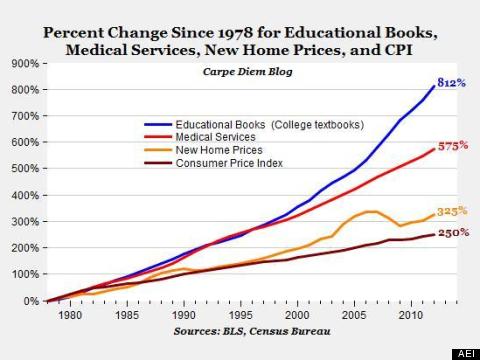
Textbook prices have been increasing at a greater rate than the Consumer Price Index for the last three decades, but the rate of increase has itself taken a dramatic upturn in the new century as shown in this graph based on Bureau of Labor Statistics and U.S. Census data:

Comparison of textbook costs to the Consumer Price Index over time

This dramatic increase is leading to students deciding not to purchase course materials, which negatively impacts student learning. According to the U.S. Public Interest Research Group (PIRG) study, Fixing the Broken Textbook Market:

  • The average student spends $1,200 on textbooks per year.
  • 65% of students said that they had decided against buying a textbook/coursepack because it was too expensive.
  • 82% of students felt they would do significantly better in a course if the textbook/coursepack was available free online and buying a hard copy was optional.

But the future doesn’t have to be so bleak. We can help you reduce or even potentially eliminate course costs for students that take your course:

  1. Collaborate with STELAR staff who can help you develop a course in Canvas which integrates many varieties of learning content already available, including traditional academic sources from the library, streaming media, open educational resources, self-published materials, and more.
  2. Use STELAR’s Media Production services to create your own learning objects in their studios.
  3. Open Educational Resources (OER) – There are a wide variety of freely available textbooks and other open courseware that can be customized, repurposed, or used as-is for a course. Find these on our Textbook Alternatives Research Guide.
  4. Resource Lists Canvas Add-on – Ask either a STELAR Instructional Designer or library staff contact about setting up a Resource List in Canvas for your course. This makes it really easy to assemble course materials composed only of materials easily accessible in existing library collections at no additional cost to students. Learn more about Resource Lists or check out the how-to documentation.
  5. Consult with subject librarians who can help you find new or replacement sources which are either part of the libraries’ collections, open access publications freely available online, or requests to purchase for the collections. For media, including the ability to quickly order, consult with Cindy Badilla-Melendez.

Are you already working to reduce course costs for students or developing open education alternatives? Please get in touch and let us know what you’re up to!

This post was written by Greg Argo, Associate Director of Access & Digital Services at the University of St. Thomas in St. Paul, MN.  To learn more about this topic, visit the library’s website at www.stthomas.edu/libraries, or email us at stelar@stthomas.edu.

Best Practices, Tips, and Tricks

Design Tips for Digital Content

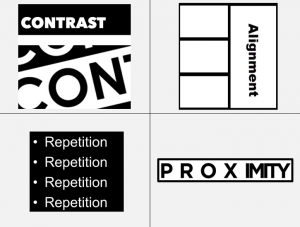
Design impacts others’ perceptions of you and your online content.  Bad design can make your message hard to interpret or understand.  The principles of CARP (contrast, alignment, repetition and proximity) are the foundations of good design, whether presented in hard copy or digital format.

Below are several additional recommendations to improve the design of your digital content.

This post was written by Glori Hinck, EdD, an Instructional Designer for the St. Thomas E-Learning and Research (STELAR) Center at the University of St. Thomas in Minneapolis, MN.  To learn more about this topic, visit our website at www.stthomas.edu/stelar, or email us at stelar@stthomas.edu.