On Thursday, November 13th at 12pm, the St. Thomas Libraries will host a one-hour Zoom session (register here) to help attendees learn about an AI-powered research tool called Consensus. The libraries are trialing Consensus for the 2025-26 academic year and want to help interested users learn how it and the class of research tools it represents differ from both traditional library tools and more web-augmented research tools like Perplexity or ChatGPT. Learn how it deploys LLM natural language searching to surface research from a corpus of 200M+ academic papers, and how it can help both students and faculty with quick-and-dirty literature reviews and syntheses of scholarship on a wide variety of topics.
Session led by librarians Scott Kaihoi and Karen Brunner.

Image by MikeAMorrison used under a Creative Commons Attribution-Share Alike 4.0 International license.
Open Access Week: October 20–26
Each year, Open Access Week celebrates the potential benefits of transitioning research to Open Access (OA). This year’s theme, “Who Owns Our Knowledge?“ emphasizes the importance of prioritizing publishing models that benefit the scholarly community and the public rather than those that benefit commercial interests.
Here are a couple of quick resources to get you thinking about OA:
- Thought-Provoking Article: We encourage faculty to read an article from the Chronicle of Higher Education titled “Making Your Research Free May Cost You” (use this link to access the Chronicle through UST’s subscription to it if the direct article link is not working). The article discusses the NIH’s new policy requiring all federally funded research to be made publicly available as soon as it is published, and how in response, many publishers are forcing authors to pay large open-access fees—effectively shifting costs onto researchers. Some journals, especially those owned by major for-profit publishers like Springer Nature and Elsevier, have eliminated free “green” routes (e.g., a one-year embargo before public release) and now only offer open access via high article processing charges. Scholars who have uncertainty in their funding–especially in an era when policies governing federal grants and other research funding are rapidly changing–are concerned that steep publication fees will limit who can afford to publish in top-tier journals.
- Library Guide on Open Access: The UST Libraries have created a guide that offers information and resources about the library’s ongoing commitment to Open Access and its role in supporting OA initiatives.
Hopefully these resources contribute to an ongoing discussion of OA on our own campus and support UST’s collective efforts to promote accessible, community-driven scholarly publishing.
China Academic Journal
The University of Saint Thomas Libraries has trial access to CNKI China Academic Journals (All Series) until November 14, 2025. The trial gives students, faculty, and staff an opportunity to explore and provide feedback to help determine whether the libraries should invest in this resource in the future.
China Academic Journals (CAJ, 中国期刊全文数据库) is the largest and most continuously updated Chinese journal database in the world, containing over 60 million full-text articles and growing. Offered via the China National Knowledge Infrastructure (CNKI, 中国知网) platform, CAJ covers 99.9% of all academic journals published in mainland China, with comprehensive access to an impressive range of content in all disciplines, with over 10,000 journals categorized among 10 series, 168 subjects, and over 3,000 sub-subjects.
We value your input! Please send any comments or questions to Kate Burke.
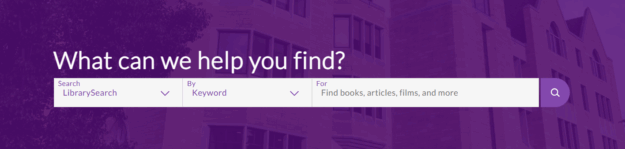
Please take a few minutes to complete our brief user experience survey to share how you currently use LibrarySearch and what improvements would make your research process easier. The St. Thomas Libraries, in collaboration with our consortium MnPALS, is in the process of evaluating LibrarySearch. Sometimes referred to as the “Google search of the library” or the library catalog, LibrarySearch is the online tool used to find everything from scholarly articles to books to digital media. We want this system to work intuitively for YOU, whether you are a professor preparing course materials, a student working on research, or staff supporting university programs.
This is your chance to help design a search experience that makes finding resources easier and more efficient for everyone in our campus community. Don’t miss this opportunity to improve how you discover and access the information you need! If you have any questions, please contact Karen Brunner, Associate Director for Research, Education & Engagement (brun4952@stthomas.edu).
Discover a New Way to Research: Try Consensus
 The UST Libraries are thrilled to be trialing Consensus for the 2025-26 academic year. Consensus is an innovative AI-powered search engine designed to provide many of the features people like about using AI tools like ChatGPT or Perplexity for research, but with a focus on academic literature rather than web searching. Consensus offers a conversational, synthesis-oriented way to surface and summarize academic sources in the early stages of a literature review.
What Sets Consensus Apart from Traditional Databases?
AI-Powered Summaries Rooted in Real Research
Conesus deploys AI only after searching academic literature, eliminating the problem many AI-driven tools have with hallucinating sources or pulling non-academic sources into its summaries. Consensus’ results are based directly on a corpus of over 200 million academic papers and book chapters.
In addition to surfacing the sources most relevant to your question, Consensus provides instant, AI-generated summaries that help you quickly get an overview of multiple papers, complete with clear citations. Every insight is traceable back to its source, allowing you to quickly go upstream and confirm critical information in its original sources. Integration with the library’s full text subscriptions allows you to often get to the full text of articles with just one click.
Smarter Search that Leverages AI to Better Understand Your Question
Traditional tools rely heavily on exact keyword matches, which can sometimes be frustrating if you are too new to a topic to know the best search phrases to try. Consensus combines semantic AI embeddings with classic keyword searching to understand your intent, and then blends that with metrics like citation counts, recency, and journal reputation to surface the most relevant results. In other words, Consensus will interpret your input to provide results regardless of whether you use simple keyword searches, natural language questions, or advanced, engineered prompts with specific output requests. Consensus will interpret and provide results for any of the following sample inputs:
- Vaccines
- antidepre
- Effects of ability grouping on academic outcomes
- Does creatine improve cognitive function in healthy adults?
- Summarize the pros and cons of carbon taxes in bullet points
Interactive Tools that Give Quick Insight
Consensus includes a variety of powerful AI features:
- Pro Analysis synthesizes findings across multiple papers, allowing you quickly get an overview of what the academic literature returned by your search says.
- Consensus Meter helps users visualize how studies answer “Yes/No” research questions by grouping them according to whether they support or contradict the question asked (e.g., do studies answer, “yes”, “no”, or “uncertain” to the research question, “Are antidepressants more effective than placebo or psychotherapy?”).

- Study Snapshot gives a short, quick summary of an individual paper to help support quick scanning of results for relevance
- Ask Paper lets you chat directly with a paper’s full text for deeper clarity on methods or findings.
- Deep Search mode is a research agent that conducts literature review-style searches of Consensus’ 200M+ article corpus, similar to deep research modes other AI tools use to do web research.
What is Its Subject Area Coverage?
While Consensus’ corpus of academic documents does have coverage in most disciplines and is worth trying, especially for multidisciplinary research, it is more robust in some areas than in others. It tends to shine in the sciences (particularly the health sciences) and be a bit more hit-and-miss in the humanities.
How Do I Get Started?
Thanks to our site-wide license, anyone with a UST university email can sign up to get access to the premium version of Consensus with all of its advanced tools and features is available free for the entire 2025–26 academic year.
Navigate to Consensus, find the “Sign Up” link in the upper right corner of the page, and use your stthomas.edu email address to create your account. After you have signed up, be sure to go into Settings in your account and set “University of St. Thomas” as your institution. This will connect your Consensus account to the UST Libraries’ subscriptions so you can access the full text of articles that we have in our collections.

We Want Your Feedback!
Throughout the trial the libraries would love to hear any feedback you are willing to provide. Please use our Consensus Trial Feedback Form to let us know what you think of the tool and whether or not the libraries should continue to provide access to it.

EBSCO has rolled out a modern, user-friendly new interface design for databases on the EBSCOhost research platform, including Academic Search Ultimate, Business Source Premier, CINAHL, and Education Source!
What’s new?
- Durable, shareable URLs
- Enhanced accessibility features, including text-to-speech
- Improved search and filtering, including a new natural language search option
- Personalized dashboard for saved searches, articles, and projects
- Responsive, mobile-friendly layout that works well on various devices
Visit EBSCO’s Quick Start Guide to learn more, or ask a librarian if you have any questions!
The University of St. Thomas Libraries invited students, staff, faculty, alumni and the public to help us name our little blue library book cart! From March 31st until April 7th, you submitted your pun-ny ideas. We definitely saw a theme of name suggestions based on famous figures and also a smattering of funky alliterations. The winner is:
Dolly Carton!
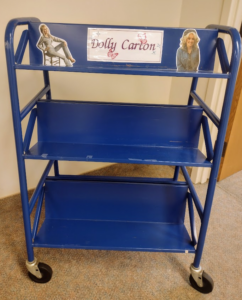
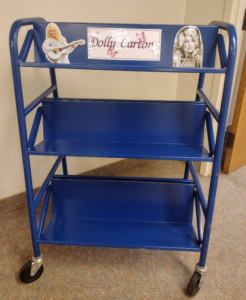
Here are the top 5 book cart names that followed our winner:
- Young Shelvin’ (as in Young Sheldon)
- René De Cart (as in René Descartes)
- The Novel Navigator
- The Literary Limo
- Jean-Luc Bookcart (as in Jean-Luc Godard)
Thank you to all who voted! Follow @ustlibraries on instagram for updates! Please contact Conrad Woxland (conrad.woxland@stthomas.edu) with questions, feedback or comments.
Generative AI Tools in Library Databases
The St. Thomas Libraries are trialing several databases in February, including two with AI-driven search interfaces: Scopus AI and Web of Science Research Assistant. The Libraries are excited about the potential for these tools to help researchers save time and uncover hard-to-find content. As we look at the broad range of AI-based tools that advertise similar functionality, we are closely evaluating their capabilities and differences.
What makes these library tools different from freely available tools?
The tools the library is trialing combine natural language AI search with high-quality, subscriber-only content. Both Scopus and Web of Science index over 20,000 journals, offering rich metadata that enhances summaries, relevancy rankings, and connections to related research. Additionally, as tools connected to our subscriptions, full-text access is often just a click away.
Free tools generate results based on either general web searches (Perplexity, ChatGPT Web Search, etc.), the Semantic Scholar corpus of academic documents (Semantic Scholar, Elicit, Consensus), or a mix of web content and publisher metadata they maintain themselves (Scite). These tools often do quite well at surfacing and summarizing relevant scholarship, particularly in fields with a lot of open access content, but results can vary widely depending on the specific subfield being researched. Some disciplines are well-covered and return excellent results, while others have gaps where important publishers or journals are missing. Free tools may also include predatory journals and student scholarship in the results they return.
So…is the library saying I shouldn’t use the free ones?
Not at all! We’re actively testing them alongside subscription-based tools to understand their strengths and limitations. Right now, it’s a “both/and” situation rather than “either/or”—free tools can help surface insights missed by traditional searches, but the tools we are trialing fill in many gaps left by the free tools, particularly when doing deep, comprehensive research.
We want your feedback!
We would love to hear from anyone who is interested in using AI tools to help them with research and has time to try out either Scopus AI or the Web of Science Research Assistant. If you have tried them, please take five minutes to fill out our feedback form. Faculty input is crucial when we evaluate new tools like this.
Please note, the February Trials have concluded.
This February, the University of St. Thomas Libraries are trialing five research databases. These resources will be available for the entire month, giving students, faculty, and staff an opportunity to explore and provide feedback to help determine whether the libraries should invest in these resources in the future.
We value your input! Please send any comments or questions to the librarian listed with each resource by February 28th.
APA PsycTests (via ProQuest)
Access APA PsycTests
APA PsycTests allows you to instantly find and download instruments for research and teaching, making it easy to access tests and measures designed for use with social and behavior science research. Each record provides a summary of the construct, and also provides information on reliability, validity, and factor analysis.
Dive into the wide range of test types including test batteries, questionnaires, rating scales, surveys, and much more.
Please contact Merrie Davidson with any questions or feedback.
Financial Times
Access Financial Times: you will need to set-up an account using your St. Thomas email
FT.com is the fully digital version of The Financial Times, a leading international newspaper that provides in-depth analysis of global markets, industries, and economic trends. Beyond business, it also covers politics, technology, climate change, social issues, and lifestyle trends, making it a valuable resource across multiple disciplines. The digital platform allows users to quickly search for topics using keywords or browse entire issues with ease.
Please contact Andrea Koeppe with any questions or feedback.
ProQuest One Academic
Access ProQuest One Academic (copy/paste link into browser):
https://login.ezproxy.stthomas.edu/login?URL=https://www.proquest.com/pq1academic
ProQuest One Academic is an all-in-one research database that provides access to scholarly journals, dissertations, newspapers, ebooks, primary sources, and streaming videos across multiple disciplines—all from a single platform. It includes four core multi-disciplinary products – ProQuest Central, Academic Complete, Academic Video Online and ProQuest Dissertations & Theses Global.
With over 40 databases, ProQuest Central includes content across all major subject areas, including business, health and medical (including nursing), social sciences, arts and humanities, education, science, engineering and religion.
ProQuest One Academic information page
Please contact Andrea Koeppe with any questions or feedback.
Scopus and Web of Science
Scopus and Web of Science are two of the most widely used multidisciplinary citation databases for academic research. Both databases are essential for literature reviews, tracking research trends, and assessing scholarly impact through citation analysis. They are competing products from two different providers. St. Thomas currently subscribes to Scopus.
Since both Scopus and Web of Science have recently added AI features to their products, the Libraries are trialing both products to solicit feedback on their functionality and to determine future needs.
Scopus AI
Access Scopus AI
Scopus AI is a powerful, AI-driven add-on feature to the Scopus database. It is designed to enhance the research process by leveraging the extensive Scopus database of peer-reviewed literature, patents, and conference proceedings. Developed to assist researchers, students, and professionals, Scopus AI simplifies the often-daunting task of sifting through massive amounts of scholarly information.
Key features of Scopus AI include:
- Smart Search Assistance: Scopus AI refines search queries, helping users locate relevant articles, papers, or datasets with precision.
- Trend Analysis: It identifies emerging trends in research fields, providing insights into current and future directions.
- Content Summarization: Scopus AI generates concise summaries of articles, saving time and making it easier to extract key findings.
- Collaboration Insights: The tool highlights key contributors, institutions, and partnerships in specific research areas.
Please contact Karen Brunner with any questions or feedback.
Web of Science, with AI Research Assistant
Access Web of Science
The Web of Science Research Assistant is a responsibly developed, generative AI-powered tool designed to enhance research and help discover fresh insights faster. The Research Assistant runs alongside researchers as they work, keeping up with research needs as they develop. Intelligent discovery helps the researcher effortlessly interpret and explore the literature. Task-based guidance and contextual prompts light up potential paths forward and enable researchers to complete complex research tasks faster.
Key features include:
- Delivery of carefully curated data from editorially selected sources, with guided walk-throughs and relevant, context-specific prompts
- Optimization for academic research use cases
- Adherence to licensing agreements, usage rights, and evolving global regulations
- Inclusion of concise overviews and commentaries, as well as dynamic visualizations such as trend graphs, topic maps, and co-citation networks
More information about the Research Assistant
Our trial also includes the Journal Highly Cited Data package, a separate analytics solution that is the combination of Journal Citation Reports and Essential Science Indicators. This has connections to Web of Science Core Collection to provide visibility to journal metrics (like Impact Factor) and article metrics (like Hot or Highly Cited Papers).
Access Journal Citation Reports
Access Essential Science Indicators
Clarivate Trial Terms and Conditions
Please contact Meg Manahan with any questions or feedback.
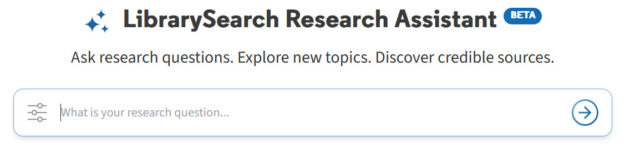
The Libraries are excited to introduce a new AI-driven way to explore scholarly sources using LibrarySearch. Research Assistant allows you to ask research questions in your own words, rather than relying on traditional keyword searching.
The tool constructs an advanced search across over 5 billion records in a unified database of vetted, reliable academic materials, then returns citations for five relevant sources and provides a brief overview of these sources based on their abstracts. Additionally, it offers suggestions for related research questions. You can also view the complete search results generated by Research Assistant in LibrarySearch.
Research Assistant enables you to discover content beyond St. Thomas collections. Items not immediately available locally can be requested through our interlibrary loan service.
As with any experimental tool, there are limitations. Research Assistant is not able to retrieve sources from local collections, like physical books owned by St. Thomas. It also excludes news content and material from certain providers, including JSTOR and Elsevier.
To make the most of Research Assistant, try asking detailed, specific questions about academic topics, like the ones displayed on the starting screen.
We hope you find this new tool helpful! We welcome you to share your feedback through a brief survey.