St. Thomas Libraries Blog - News, Events and Musings from the UST Libraries - Page 84
Database Highlights & Trials

Scottsboro Boys at the Guthrie and at the library

My faithful reader (you know who you are) may remember last month when I tied in the Science Museum’s Dead Sea Scrolls exhibit to UST library resources.  Well, I’m leaning on the cultural resources of our community again to highlight even more resources.  The Guthrie Theater’s production of The Scottsboro Boys is an excellent and must-see-soon (it’s ending Sept. 25) show about the case, spanning most of the 1930’s , when 9 African-American men were unjustly accused of a horrible crime.

The African American Studies Center covers the incident in great detail.  You can read transcripts of the Supreme Court cases (Norris vs. Alabama and Powell vs. Alabama)  in the U.S. Supreme Court Records and Briefs (compliments of the Law Library).  Using our new search engine Summon, you can search on Scottsboro boys and limit to resources before 12/31/37, to get articles written about the case while it happening.  You get several perspectives on the case, the incident, and the play by using Blackwell Reference Online.  And if you’re not much of a reader (again, you know who you are), why not watch the 90 minute documentary Scottsboro: An American Tragedy from Films on Demand?

Libraries, New Materials, News & Events

Research Guides Re-imagined

Not sure how you can find those “peer-reviewed” articles your prof wants you to use in that research paper?  Don’t know where to find the definition of “heteroscedasticity” for that econometrics assignment? Trying to trace the first usage of ‘Google’ as a verb? Wondering how the heck you’re supposed to find books on ‘Cosmopolitanism and the geopolitics of feminist rhetoric’?

Try the Libraries’ Research Guides!!

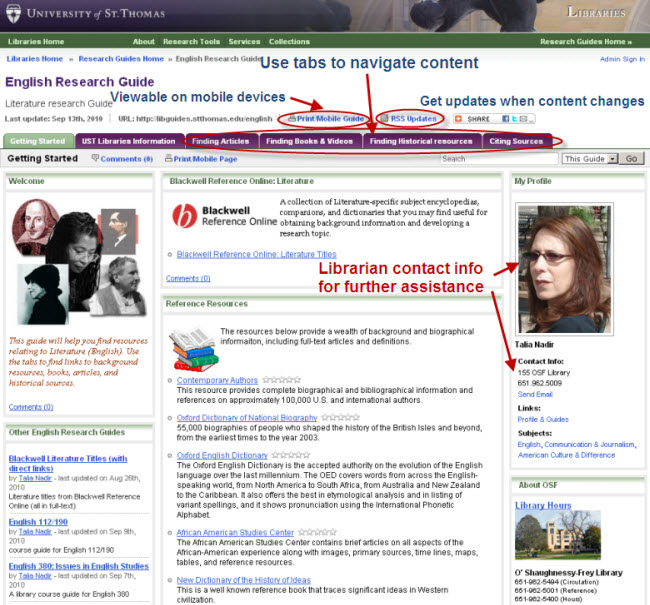
The Research Guides, accessible from the library home page or via this direct link are authored by our liaison librarians and will give you specific suggestions of appropriate sources (e.g. scholarly library subscription databases, book catalogs, vetted free web sites, etc.) by format, subtopic, etc. This summer, we completely rebuilt this portion of our website, using a new software product called Libguides.  The new system offers a number of advantages over the old web pages, including:

  • Tabbed layout for understandable organization and easy navigation (see screen shot below)
  • More engaging visual layout, easier integration of images, audio and video content
  • More dynamic content with automatically updated lists of new books, feeds of relevant news and article content, etc.
  • Easy access to your librarian’s contact info for follow-up, plus integrated chat reference service
  • Ability for users to comment on and rate the resources
  • Ability to be notified if changes are made to a guide

libguides_screenshot


Note to faculty members:

Many professors have linked to our old web pages on their Blackboard or other course web sites: if you have done so, please update them by finding the appropriate links from the subject listings.  You may also want to review our web page that demonstrates how to link a Research Guide to a Blackboard course.

Instructors wishing to have a new guide created to address research assignments in their specific courses, or who would like resources added to an existing guide should contact their Liaison Librarian for assistance.

News & Events

Find the library content you need with Summon!

(The following Bulletin Today article from Sept 09, describes how UST Libraries offers a new way to find library resources – Summon.)

Summon provides a new approach to searching millions of articles, books, book chapters and catalog records simultaneously. Considered a discovery tool, Summon allows users to get library resources through a familiar, Google-like, single search box; however, instead of searching the free Web, Summon searches library-subscribed resources (academic and trade journals, e-books, books, DVDs, etc.).

How it works: Serials Solutions, the creators of Summon, signed agreements with journal, newspaper and book publishers to index their content. Through UST’s library subscriptions, access is provided to tens of thousands of full-text e-journals and hundreds of e-books. Serials Solutions sees where the publisher’s agreements and St. Thomas’ subscriptions overlap and retrieves results based on what the university has in its possession.

Keep in mind that not all publishers have agreed to have their content indexed by Serials Solutions, and UST does not have subscriptions with all e-resource publishers. Summon is great for bibliographic content but not as good for statistics, country, company or industry information.

Faculty and students alike will benefit from Summon. Researchers who may have their favorite “go-to” databases will discover a greater quantity of relevant content by casting a search across library-subscribed resources. If you don’t know which specialized research databases to use, start with Summon and become familiar with subject-specific resources down the road.

Start finding library content by giving Summon a test drive. Learn more about Summon here.

Database Highlights & Trials

Summon

Just in time for the fall, a whole new approach to doing library research.  UST Libraries is now offering Summon – a new discovery tool that allows you to search many (but not all) library resources the same way you search the free web. Think of it as a Google-like approach to the libraries’ resources.

Summon is a rich, bibliographic searching tool that retrieves content from most, but not all, of the library resources.  Your results will return such varied media as:

audiovideobookscore

journaldissertationconfebook

If the item isn’t available in full-text in Summon, it links you to the full-text (or tells you where the paper copy is on the shelves) through the Get it button.

It works by indexing content from thousands of publishers.  Then it retrieves results from publishers with whom we have agreements.  Summon doesn’t index content from all publishers, nor do we have agreements with all publishers.  So in many cases you’ll still want to use subject-specific databases to find more info.  But when you don’t know where to start, Summon is a good place.

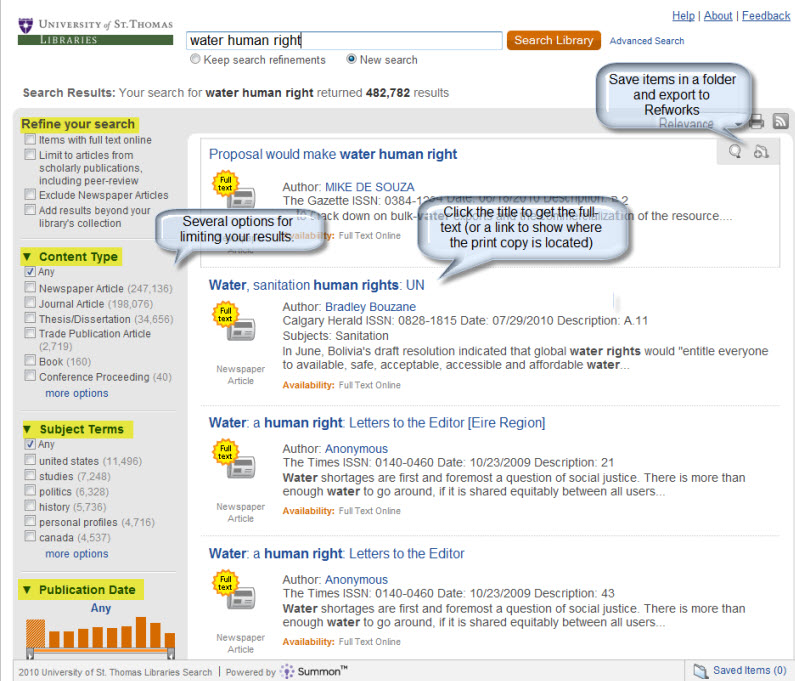
Here’s an example of beginning my research on water as a human right.

summonscreenshot1

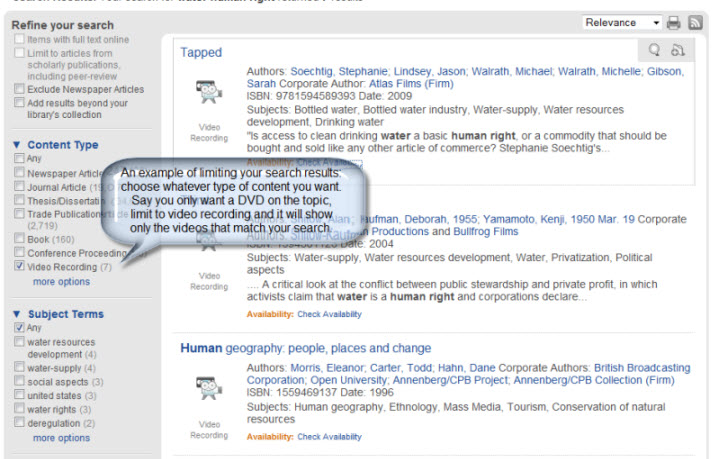
Your results are retrieved in ranked order.  If your keyword shows up in the title of the article, it ranks highest.  The ranking  order continues with  abstract, metadata, and finally full-text.  The full-text is available by clicking on the title and you can save records to export to email or Refworks.  Like Google, you’ll get many, many results because Summon indexes articles, books, and book chapters, as well as library catalog records.  However, don’t get overwhelmed, there are several excellent limiting options.

summonscreenshot2

Give it a try – go on, you know you want to.  I’m curious to know what you think about Summon so please feel free to comment.

Database Highlights & Trials

Adding content to folders in Ebsco – RESOLVED

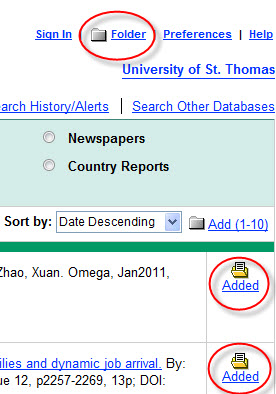
ebscofolder(9/21/10) This problem has been resolved!

Lately we’ve been experiencing sporadic problems with adding records to folders in several Ebsco products.  Now, for those of you in the know, you’ll know what I’m talking about.  For the rest of you, skip to the next part where I tell you what you’re missing.

Ok, the problem – which is known by Ebsco tech support, by the way – is that you try to add items to a folder only to find that nothing has gone into said folder. In my screen shot it shows that I’ve added two articles to my folder, but my folder is CLEARLY empty.  Not cool.  My little folder at the top of the screen shot is supposed to open up when I’ve added content to it.  Obviously, content hasn’t made it there.  Like I said, Ebsco is working on this problem.  No word on when it’s going to be fixed, however.

In the meantime, what can you do?  Well, there’s a work-around that’s been mostly successful (but not always).  After getting  your list of results and finding an article you’re interested in saving  (and/or outputting to Refworks),  click on the title to get to the full record and then add it to a folder.  That’s been mostly working.

Oh, for you super advanced users who’ve already set up an account and are trying to add records to your own personal folders.  Sorry, you’re outta luck too.  It doesn’t matter if you’re logged in as yourself or not.  It’s simply not working from the brief records list.

ebscologoWe have over 30 Ebsco products and I’m not going to list them all here cuz, well, it’d be a really long and boring list.  Suffice it to say, if you can’t save records to a folder and you see this logo  then you’re using an Ebsco database.

Those of you in the dark on saving items to folders, you are in for a wild ride!  You are missing out on some real exciting stuff here.  I’m about to open up a whole new world for you!   Yeah, so… create an account in any of the 32 Ebsco databases we have and you’ll be able to:

  • Save preferences
  • Organize your research with folders
  • Share your folders with others
  • View others’ folders
  • Save and retrieve your search history
  • Create email alerts and/or RSS feeds
  • Gain access to your saved research remotely

Now you know and you’re gonna rush out and set up an account in Business Source Premier, Communication &  Mass Media Complete or SPORTDiscus Fulltext.

News & Events, O'Shaughnessy-Frey Library

New Online Library Reserves Form now available for faculty

Fall semester is just around the corner and putting course materials on reserve at the university’s libraries has never been easier.

Instructors may now add library reserve materials using a new online form. This form is intended for UST Libraries-owned materials; however, faculty also may fill it out, print it and submit it with personal reserve items brought to the library.

Complete course reserves procedures and contact information for reserves coordinators can be found on the Libraries Course Reserves web page.

News & Events, O'Shaughnessy-Frey Library

Library users invited to review proposed subscription cancellations

Message from Dani Roach, head of  serials in the UST Libraries:

The process of selecting information resources (electronic resources, books and journal subscriptions) for the scholarly needs of the UST community is based on collaboration between library staff and our users.

We continually assess the subscriptions that we have to both print and electronic content to ensure that we are providing access to the best and most useful materials.

To determine what those are, a number of factors are considered: available budget, costs of resources, use of materials and the allocation of resources to specific academic areas.

The libraries are grateful for the continued support of the university as we develop robust collections for the community. Library resources are still being used, and increasingly those materials that are available electronically are the most popular.

We take our role as stewards of the university’s resources very seriously. In making collection development decisions for the coming year, we have:

  • Evaluated the use of all journals (regardless of format)
  • Consulted with faculty regarding their need for and use of journals
  • Determined the full-text availability of journals currently subscribed to in print
  • Minimized duplication between print and electronic resources
  • Minimized duplication among the UST libraries
  • Identified new resources that are appropriate and valuable for our community

For the record, the university’s libraries provide access to 44,791 electronic journals and have 1,252 active print/microfilm journal subscriptions. In addition, we provide access to 254 electronic databases, including several new ones for this academic year.

We invite the campus community to review and comment on the recommendations we have for cancellations. We propose canceling 23 titles for which there will be no exact counterpart available on campus. Please take a moment to examine the list to ensure that we have identified the least-used resources for the campus.

Contact Dani Roach, (651) 962-5408, by Friday, Sept. 10, with comments about titles on these lists or with suggestions for resources that the libraries should consider for purchase.

Database Highlights & Trials

Dead Sea Scrolls

Maybe you popped over to the Science Museum of Minnesota to see their Dead Sea Scrolls exhibit this summer.

And just maybe it spurred a HUGE interest in finding out more about the scrolls, life during the time of Jesus, or Judaism. According to the SMM, “the scrolls have a profound impact of Christianity, Judaism, the Muslim faith, and you’ll see examples of how their words have echoed in these three great religions for 200 years.”

We at the UST libraries are pleased to be able to help you find out more about some of the oldest surviving written documents by offering you 24/7 access to The Encyclopedia of the Dead Sea Scrolls.  To supplement that, we have many other resources that may be of interest.    The Encyclopedia of Religion puts the Dead Sea Scrolls within the context of the major world religions.  The Encyclopedia Judaica can answer your questions about Judaism.   The Oxford Islamic Studies Online gives you background information on the Islamic world.  And the Encyclopedia of the Historical Jesus include articles on life during the time of Jesus, as well as the life of Jesus.

These are just a few of the hundreds of e-books we have on religion.  Using this Reference Resource tool you can do keyword searches to find more e-books on religion or history or just about any topic you can think of.  (Please note, you are not searching the content of e-books, simply the titles and subject headings of e-books).

For those of you still interested in seeing the Science Museum exhibit, you still have time.  The Dead Sea Scrolls ends October 24, 2010.